
This report can give you insight into the effectiveness of your bulk email campaigns, or help explain why you are not able to reach every person you select for a bulk email.
The Contact Information Quality Report shows the user what contact information is missing or invalid. Sorted by community, the table breaks down missing phone numbers and emails, and invalid phone numbers and emails. If a profile is missing both, that is indicated in the "Both" column. "Total Unreachable" totals the missing and invalid contact information.
The table is also sorted into rows of Prospects, influencers, and referrers:
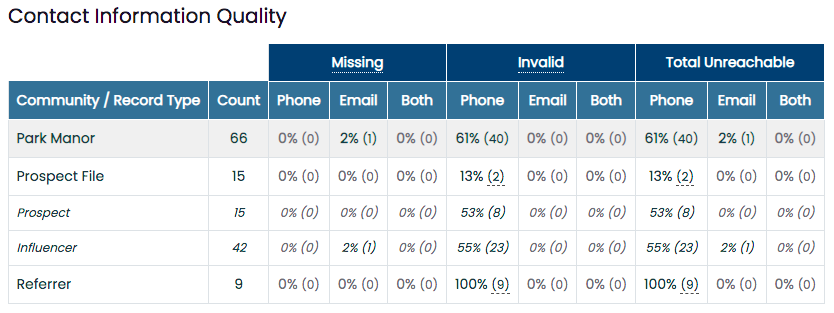
This report can be filtered by community:

*NOTE: Reports are now fully customizable and can be edited, formatted, and saved as additional reports within the Standard Reports tab. See the Customized Reports ARTICLE and VIDEO for in-depth instruction. The selected community/communities and date ranges will remain unchanged or "sticky" when you leave and return to the page for all Standard Reports.
*Note: Some reports now include a "Heatmap" dropdown option, which allows you to highlight specific columns that automatically color-code them from either best-to-worst or worst-to-best; green being the best and red being the worst.