
Pull this report when you are looking to see the amount of completed activities versus the goal for the selected time period and/or the difference between the two.
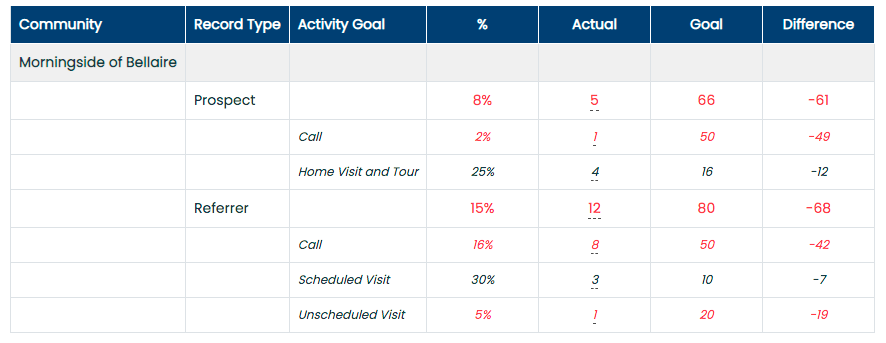
Activity vs. Goal: This report shows the following information:
- Record Type (Prospect & Referrer)
- Activity Goal
- Percentage of the actually completed activities for the selected time period divided by the goal amount
- The actually completed activity compared to the goal set
- Difference between the goal and how much of it was complete (A positive difference means, the amount of activity completed is higher than the goal. A negative difference means the goal wasn't met)
This report can be filtered by community and date.

*Note: Reports are now fully customizable and can be edited, formatted, and saved as additional reports within the Standard Reports tab. See the Customized Reports ARTICLE and VIDEO for in-depth instruction. The selected community/communities and date ranges will remain unchanged or "sticky" when you leave and return to the page for all Standard Reports.
*Note: Some reports now include a "Heatmap" dropdown option, which allows you to highlight specific columns that automatically color-code them from either best-to-worst or worst-to-best; green being the best and red being the worst.