
You have two options when moving out a resident: record a move out notice for a future move out, or move someone out today.
*Note: If you have an integration with a billing software or EMR you should NOT be doing the below in WelcomeHome. Move-outs will push back into WelcomeHome from your EMR.
To do either of these options, navigate to the Occupancy section within WelcomeHome.
Search for the resident on your Occupancy Board or search within the "Residents" tab under Occupancy
Click on their name to go to the Resident profile.

If you are recording a future move out, click "Record Move Out Notice". If you are recording a move out that has already occurred or is happening today, click "Move Out"
If you click "Record Move Out Notice", you'll see the below options. The three required fields are: Notice given date, Move-out date, and Move-out reason.
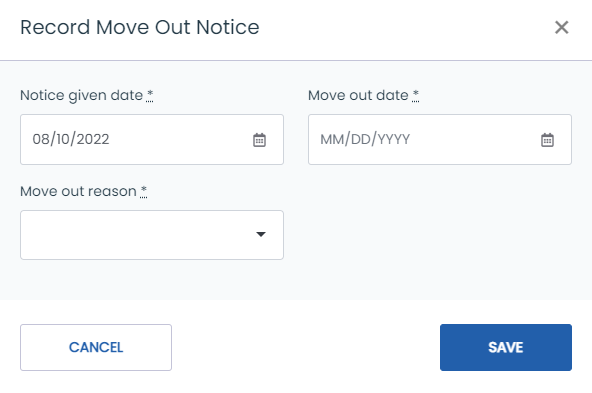
If you click "Move Out", you'll see the below options. The three required fields are: Notice given date, Move-out date, and Move-out reason.
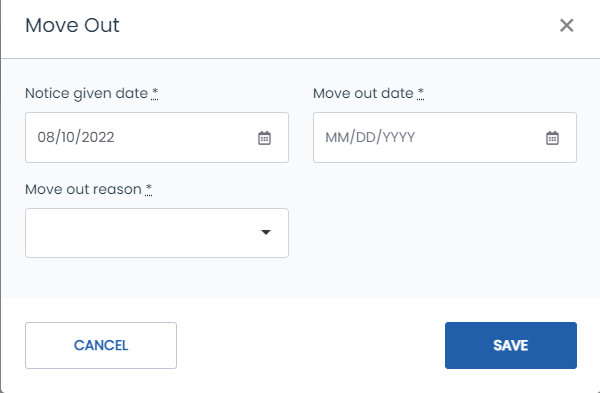
Click "Save". If the move-out date is in the future, the system will move the resident out on that date. If the move-out date is today, the resident will move out at midnight. If the move-out date is in the past, the resident will move out upon saving!